

XPArea Support for RPG maker XP
BMM_Archive · July 16, 2026

Original Source
- Original title: Area Support for RPG maker XP
- Original author: Wecoc
- Original date: August 17, 2021
- Source thread: https://forums.rpgmakerweb.com/threads/area-support-for-rpg-maker-xp.139673/
- Source forum path: Game Development Engines > Ruby Game System (RGSS) Scripts > RGSS Scripts (RMXP)
Summary
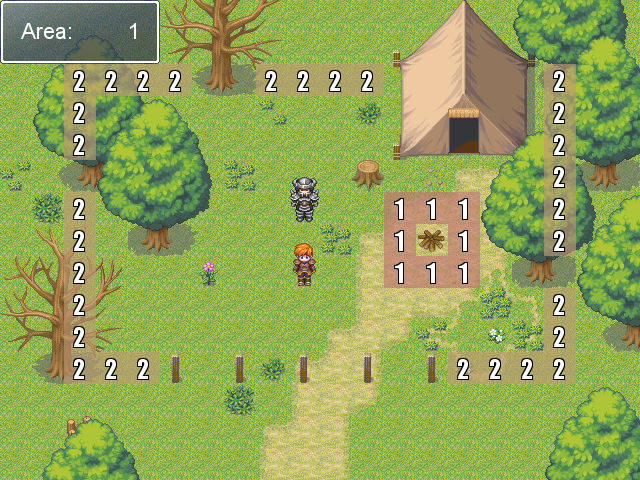
This script implements Areas (or Regions) in RPG maker XP, so they work the same way as in more modern RPG maker versions. They work in parallel with terrain tags without changing anything on them, and the way to check them via script is also very similar. To set them, execute your game in Debug mode and press F8. The option of placing the areas directly along the map using the mouse will be activated. To change the area index, press Q / W (or Page Down / Page Up)...
Archived First Post
They work in parallel with terrain tags without changing anything on them, and the way to check them via script is also very similar.
To set them, execute your game in Debug mode and press F8. The option of placing the areas directly along the map using the mouse will be activated. To change the area index, press Q / W (or Page Down / Page Up) and use the directional arrows to scroll across the map. The changes will be saved in real time.
If you are using another Mouse script in your game, you can remove the Glitchfinder Key and Mouse and use the one you are already using (the methods in the Setup Mode script will have to be adapted).
Author: Wecoc
First Release: September 2016
Last Version: October 2018
Credits
- Wecoc (Area implementation)
- Glitchfinder (Keyboard & Mouse modules)
Terms of use
- Please give credits to everyone on the list above.
- You can repost this code.
- You can edit this code freely, and distribute the edits as well.
- This code can be used on commercial games.
Instructions
Download the demo and copy the four scripts on your game: Key Input, Mouse, Area Base and Area Setup.
There's not much to it apart from that.
You can define areas that are always passable or non-passable on the start of Area Base, and you can change the debug button (F8) on Area Setup.
Demo: Area Support 1.1.zip
$game_map.area(X, Y)
Set the area of a map coordinate by event
$game_map.set_area(X, Y, Area ID)
Get the current area of the player or an event
$game_player.area
$game_map.events[Event ID].area
This script also has some script addons available. I'll include a few below.
#==============================================================================
# ** Event Area Restrictions
#==============================================================================

class Game_Character

  attr_accessor :passable_areas
  attr_accessor :no_passable_areas

  alias areas_pass_ini initialize unless $@
  def initialize(*args)
    areas_pass_ini(*args)
    @passable_areas = {}
    @no_passable_areas = {}
    @passable_areas.default = false
    @no_passable_areas.default = false
  end

  def set_passable(area, value=true)
    if value == true
      @passable_areas[area] = true
      @no_passable_areas[area] = false
    else
      @passable_areas[area] = false
    end
    return true
  end

  def set_no_passable(area, value=true)
    if value == true
      @no_passable_areas[area] = true
      @passable_areas[area] = false
    else
      @no_passable_areas[area] = false
    end
    return true
  end

  def clear_passable(area)
    set_passable(area, false)
  end

  def clear_no_passable(area)
    set_no_passable(area, false)
  end

  alias areas_pass? passable? unless $@
  def passable?(x, y, d)
    new_x = x + (d == 6 ? 1 : d == 4 ? -1 : 0)
    new_y = y + (d == 2 ? 1 : d == 8 ? -1 : 0)
    return false if @no_passable_areas[self.area] == true
    return false if @no_passable_areas[$game_map.area(new_x, new_y)] == true
    return false unless $game_map.valid?(new_x, new_y)
    return true if @passable_areas[$game_map.area(new_x, new_y)] == true
    areas_pass?(x, y, d)
  end
end
For example:
$game_map.events[Event ID].set_passable(Area ID)
$game_player.set_passable(Area ID)
You can use set_passable, set_no_passable, clear_passable and clear_no_passable.
#==============================================================================
# ** [XP] Area Helper
#------------------------------------------------------------------------------
#  Author: Wecoc
#==============================================================================

module Setup
  AREA_HELPER = {1 => "Example", 10 => "Passable", 11 => "No passable"}
  AREA_HELPER.default = ""
end

class Scene_Map
  alias area_helper_call_setup call_setup unless $@
  def call_setup
    @helper_window = Window_Base.new(160, 0, 480, 64)
    @helper_window.back_opacity = 160
    width = @helper_window.width - 32
    height = @helper_window.height - 32
    @helper_window.contents = Bitmap.new(width, height)
    @helper_window.visible = false
    area_helper_call_setup
  end

  alias area_helper_refresh_area refresh_area unless $@
  def refresh_area
    area_helper_refresh_area
    @helper_window.contents.clear
    text = Setup::AREA_HELPER[@area_id]
    @helper_window.contents.draw_text(4, 0, 480 - 32, 32, text)
  end

  alias area_helper_update_setup update_setup unless $@
  def update_setup
    area_helper_update_setup
    @helper_window.update
    @helper_window.visible = @area_window.visible
  end

  alias area_helper_exit_setup exit_setup unless $@
  def exit_setup
    area_helper_exit_setup
    @helper_window.dispose
  end
end
Downloads / Referenced Files
RPG Maker Web attachments are mirrored locally when available. Other external links remain hosted by their original creator or third-party service.
- Download: Area Support 1.1.zip
License / Terms Note
Credits Wecoc (Area implementation) Glitchfinder (Keyboard & Mouse modules) Terms of use
Referenced Images / Attachments
Creator Claims / Removal
If you are the original creator and want this listing reassigned, edited, or removed, join BMMPlay and contact the moderators with proof that matches the original RPG Maker Web profile, linked GitHub, itch.io page, or another public creator identity.
Replies (0)
No replies yet.
Topic Summary
Loading summary...