

XPParty Changer Menu
BMM_Archive · July 16, 2026

Original Source
- Original title: Party Changer Menu
- Original author: BlackMage
- Original date: February 19, 2015
- Source thread: https://forums.rpgmakerweb.com/threads/party-changer-menu.37100/
- Source forum path: Game Development Engines > Ruby Game System (RGSS) Scripts > RGSS Scripts (RMXP)
Summary
Party Changer Menu 1.2 by Black Mage Introduction When you using RMXP, you’ll notice that when the party is full then you need to take out someone in your party before adding the other character. When you have small number of available characters, this wouldn’t be a problem as it can be solved using events and conditional branches. But what if you have a large ammount of them? Let’s say about a hundred of them or so? The eventing must be soo tiring.
Archived First Post
by Black Mage
Introduction
When you using RMXP, you’ll notice that when the party is full then you need to take out someone in your party before adding the other character. When you have small number of available characters, this wouldn’t be a problem as it can be solved using events and conditional branches. But what if you have a large ammount of them? Let’s say about a hundred of them or so? The eventing must be soo tiring.
This script will easen you as it gives you a menu where you can change characters inside the party with characters that is available to player with just a click, or presssing the confirmation button :v .
Features
- You can change party easily (obvious duh).
- Friendly with a game that have too many characters, i.e. suikoden.
- Two modes, Normal Mode (or the old one mode ) and Information Mode.
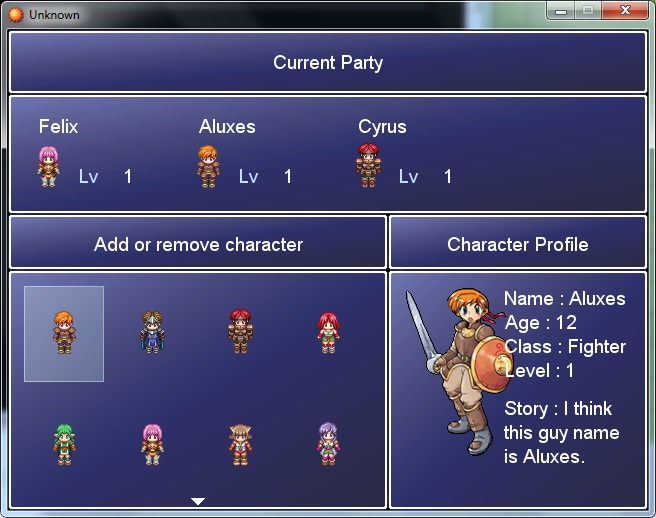
Regarding the modes, they'll be explained using screenshots.
Screenshots
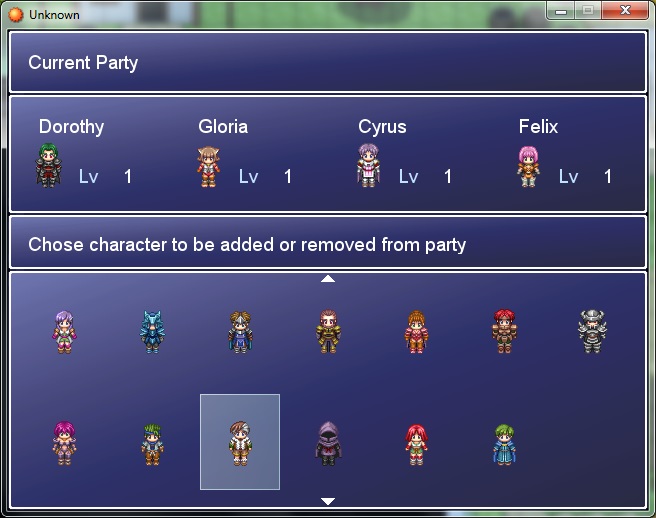
Information Mode
How to Use
The set up is simple. First, put this script on your game (above the main as usual). After that, you just need to specify which characters that player can change in their party using this script call.$partychange[Character Number In Database – 1] = true$game_map.refresh
So, if you want to put Character number 3 to be available in the party changer menu, put this on script call.
$partychange[2] = true$game_map.refresh
Change the value into false if you want to remove them from the menu.
To call the menu, put this on script call.
$scene = Scene_Party.new
The version 1.2 above give you a menu mode called "Information Mode" where it include a profile of the character that is highlighted in the menu. Beware that this mode is highly customizable, so you need some knowledge on RGSS scripting to utilize to it upmost potential. To call this menu, put this on script call
$scene = Scene_Party.new(0,1)
If you have some knowledge on RGSS scripting, you may do edits to Profile Window located on line 350 onwards to make the Profile Window that you like.
Demo
Demo using Script V-1.1 (Mediafire)
Script
################################################################################ # Party Changer Script By Black Mage # Version : 1.2 # # The set up : # First, put this script on your game. After that, you just need to # specify which characters that player can change in their party using this script call. # $partychange[Character Number In Database – 1] = true # $game_map.refresh # Change the value into false if you want to remove them from the menu. # # To call the menu, put this on script call. # $scene = Scene_Party.new # # The version 1.2 above give you a menu mode called "Information Mode" where it # include a profile of the character that is highlighted in the menu. Beware that this # mode is highly customizable, so you need some knowledge on RGSS scripting to utilize # to it upmost potential. # To call this menu, put this on script call. # $scene = Scene_Party.new(0,1) # # If you have some knowledge on RGSS scripting, you may do edits to Profile Window # located on line 350 onwards to make the Profile Window that you like. ################################################################################ $partychange = [] class Scene_Party #-------------------------------------------------------------------------- # * Object Initialization # menu_index : command cursor's initial position #-------------------------------------------------------------------------- def initialize(menu_index = 0, window_form = 0) @menu_index = menu_index @window_form = window_form end #-------------------------------------------------------------------------- # * Main Processing #-------------------------------------------------------------------------- def main # Make Help Window @help_window = Window_PartyHelp.new @help_window2 = Window_PartyHelp2.new(@window_form) # Make Party Change Window @partychange_window = Window_PartyChange.new(@window_form) @partychange_window.x = 0 @partychange_window.y = 240 @partychange_window.active = true @partychange_window.index = 0 # Make party window @party_window = Window_Party.new @party_window.x = 0 @party_window.y = 64 # If mode 1 enabled if @window_form == 1 @help_window3 = Window_PartyHelp3.new @profile_window = Window_Profile.new end # Execute transition Graphics.transition # Main loop loop do # Update game screen Graphics.update # Update input information Input.update # Frame update update # Abort loop if screen is changed if $scene != self break end end # Prepare for transition Graphics.freeze # Dispose of windows @partychange_window.dispose @party_window.dispose @help_window.dispose @help_window2.dispose # If mode 1 enabled if @window_form == 1 @help_window3.dispose @profile_window.dispose end end #-------------------------------------------------------------------------- # * Frame Update #-------------------------------------------------------------------------- def update # Update windows @partychange_window.update @party_window.update # Update the profile window if mode 1 is true if @window_form == 1 @profile_window.update(@partychange_window.index) end # Update the party change window if @partychange_window.active update_partychange return end end #-------------------------------------------------------------------------- # * Frame Update (when party window is active) #-------------------------------------------------------------------------- def update_partychange # If B button was pressed if Input.trigger?(Input:: # Play cancel SE $game_system.se_play($data_system.cancel_se) # Switch to map screen $scene = Scene_Map.new return end if Input.trigger?(Input::C) @hero = @partychange_window.hero # If Hero is Nil if @hero == nil $game_system.se_play($data_system.decision_se) return end if $game_party.actors.include?($game_actors[@partychange_window.hero.id]) $game_party.remove_actor(@partychange_window.hero.id) @party_window.dispose @party_window = Window_Party.new @party_window.x = 0 @party_window.y = 64 $game_system.se_play($data_system.decision_se) @party_window.refresh return else $game_party.add_actor(@partychange_window.hero.id) @party_window.dispose @party_window = Window_Party.new @party_window.x = 0 @party_window.y = 64 $game_system.se_play($data_system.decision_se) @party_window.refresh return end end end end ########## #Displaying the Party Change Window ########## class Window_PartyChange < Window_Selectable #-------------------------------------------------------------------------- # * Object Initialization #-------------------------------------------------------------------------- def initialize(window_form = 0) @window_form = window_form case window_form when 0 super(0, 0, 640, 240) @column_max = 7 when 1 super(0, 0, 380, 240) @column_max = 4 end refresh self.index = 0 end #-------------------------------------------------------------------------- # * Get Hero #-------------------------------------------------------------------------- def hero return @data[self.index] end #-------------------------------------------------------------------------- # * Refresh #-------------------------------------------------------------------------- def refresh if self.contents != nil self.contents.dispose self.contents = nil end @data = [] if $partychange.size > 0 for i in 0..$partychange.size if $partychange[i] == true @data.push($game_actors[i+1]) end end @item_max = @data.size self.contents = Bitmap.new(width - 32, row_max * 112) for i in 0..(@item_max - 1) case @window_form when 0 x = ((i) % 7 * (88)) + 40 y = (((i)/7) * 112) + 70 when 1 x = ((i) % 4 * (88)) + 40 y = (((i)/4) * 112) + 70 end actor = @data[i] bitmap = RPG::Cache.character(actor.character_name, actor.character_hue) cw = bitmap.width / 4 ch = bitmap.height / 4 src_rect = Rect.new(0, 0, cw, ch) self.contents.blt(x - cw / 2, y - ch, bitmap, src_rect) end end end #-------------------------------------------------------------------------- # * Cursor Rectangle Update #-------------------------------------------------------------------------- #Redefine Row def top_row return self.oy / 112 end def top_row=(row) if row < 0 row = 0 end if row > row_max - 1 row = row_max - 1 end self.oy = row * 112 end def page_row_max return (self.height) / 112 end def update_cursor_rect if @index < 0 self.cursor_rect.empty return end row = @index / @column_max # If current row is before top row if row < self.top_row # Scroll so that current row becomes top row self.top_row = row end # If current row is more to back than back row if row > self.top_row + (self.page_row_max - 1) # Scroll so that current row becomes back row self.top_row = row - (self.page_row_max - 1) end # If cursor position is less than 0 case @window_form when 0 self.cursor_rect.set(index % 7 * (88), (@index/7) * 110 - self.oy + ((@index/7) * 2), self.width - 560, 96) when 1 self.cursor_rect.set(index % 4 * (88), (@index/4) * 110 - self.oy + ((@index/4) * 2), self.width - 300, 96) end end end ########## #Displaying current Party Window ########## class Window_Party < Window_Selectable #-------------------------------------------------------------------------- # * Object Initialization #-------------------------------------------------------------------------- def initialize super(0, 0, 640, 120) @column_max = 2 self.contents = Bitmap.new(width - 32, height - 32) refresh self.active = false self.index = -1 end #-------------------------------------------------------------------------- # * Refresh #-------------------------------------------------------------------------- def refresh self.contents.clear @item_max = $game_party.actors.size @collumn_custom = 1 for i in 0...$game_party.actors.size x = (i % 4 * (160)) + (64) y = (i/4) * 116 actor = $game_party.actors[i] draw_actor_graphic(actor, x - 40, y + 80) draw_actor_name(actor, x - 50, y) draw_actor_level(actor, x - 10, y + 50) end end end ########## #Displaying Help Window ########## class Window_PartyHelp < Window_Base #-------------------------------------------------------------------------- # * Object Initialization #-------------------------------------------------------------------------- def initialize super(0, 0, 640, 64) self.contents = Bitmap.new(width - 32, height - 32) self.contents.clear self.contents.font.color = normal_color self.contents.draw_text(4, 0, self.width - 40, 32, 'Current Party', 1) end end class Window_PartyHelp2 < Window_Base #-------------------------------------------------------------------------- # * Object Initialization #-------------------------------------------------------------------------- def initialize(window_form = 0) case window_form when 0 super(0, 184, 640, 56) when 1 super(0, 184, 380, 56) end self.contents = Bitmap.new(width - 32, height - 32) self.contents.clear self.contents.font.color = normal_color self.contents.draw_text(4, 0, self.width - 40, 28, 'Add or remove character', 1) end end class Window_PartyHelp3 < Window_Base #-------------------------------------------------------------------------- # * Object Initialization #-------------------------------------------------------------------------- def initialize(window_form = 0) super(380, 184, 260, 56) self.contents = Bitmap.new(width - 32, height - 32) self.contents.clear self.contents.font.color = normal_color self.contents.draw_text(4, 0, self.width - 40, 28, 'Character Information', 1) end end ########## #The Customizable Character Profile ########## class Window_Profile < Window_Base #-------------------------------------------------------------------------- # * Object Initialization #-------------------------------------------------------------------------- def initialize super(380, 240, 260, 240) self.contents = Bitmap.new(width - 32, height - 32) end def update(index) #==================== # Window Profile Customization #==================== picture = true # Set to false if you don't want to use picture. x_pos = 100 # Denotes the possition of the text. x_pic = 0 # Denotes the possition of the picture. font_size = 22 # The font size. 22 is the default size. @index = index self.contents.clear @data = [] # Get the actor data if $partychange.size > 0 for i in 0..$partychange.size if $partychange[i] == true @data.push($game_actors[i+1]) end end end if picture == true actor = @data[index] bitmap = RPG::Cache.battler(actor.battler_name, actor.battler_hue) cw = bitmap.width ch = bitmap.height src_rect = Rect.new(0, 0, cw, ch) self.contents.blt(x_pic, 0, bitmap, src_rect) end # Do something if $partychange.size > 0 self.contents.font.size = font_size self.contents.draw_text(x_pos, 0, 300, 24, 'Name : ' + @data[index].name, 0) case actor.id when 1 age = '12' when 2 age = '12' else age = '???' end self.contents.draw_text(x_pos, 24, 300, 24, 'Age : ' + age, 0) self.contents.draw_text(x_pos, 48, 300, 24, 'Class : ' + @data[index].class_name, 0) self.contents.draw_text(x_pos, 72, 300, 24, 'Level : ' + @data[index].level.to_s, 0) case actor.id when 1 self.contents.draw_text(x_pos, 110, 300, 24, 'Story : I think', 0) self.contents.draw_text(x_pos, 134, 300, 24, 'this guy name', 0) self.contents.draw_text(x_pos, 158, 300, 24, 'is Aluxes.', 0) else self.contents.draw_text(x_pos, 110, 300, 24, 'Nothing to talk ', 0) self.contents.draw_text(x_pos, 134, 300, 24, 'about', 0) end end end endFAQ
Q : How to edit the Character Information Window on Information Mode?
A : Learn some basic RGSS scripting regarding the window and such. Then go to line 350 onwards and feel free to edit things below those line.
Credit and Thanks
- Black Mage
- Lysan Dear (Suggested the Information Mode)
Author's Notes
If you having trouble on using this script, and it seems that I rarely appeared here, you can go directly to my wordpress, and ask something there. I mostly roaming around there so there's no need to worry that your question will be left unanswered.
Here's link to the pages of this script in my wordpress.
Party Changer Menu
Features Mentioned
- You can change party easily (obvious duh).
- Friendly with a game that have too many characters, i.e. suikoden.
- Two modes, Normal Mode (or the old one mode ) and Information Mode.
- Regarding the modes, they'll be explained using screenshots.
Downloads / Referenced Files
RPG Maker Web attachments are mirrored locally when available. Other external links remain hosted by their original creator or third-party service.
- Download: Demo
License / Terms Note
Credit and Thanks - Black Mage - Lysan Dear (Suggested the Information Mode) Author's Notes
Referenced Images / Attachments
Creator Claims / Removal
If you are the original creator and want this listing reassigned, edited, or removed, join BMMPlay and contact the moderators with proof that matches the original RPG Maker Web profile, linked GitHub, itch.io page, or another public creator identity.
Replies (0)
No replies yet.
Topic Summary
Loading summary...