

VXKToggleButtons VX
BMM_Archive · July 16, 2026

BMM_Archive
Preserved forum archive. This topic stores the original first post and locally mirrored RPG Maker Web attachments when available. It is posted by the BMMPlay archive account, not by the original creator.
Original Source
- Original title: KToggleButtons VX
- Original author: kyonides
- Original date: November 4, 2022
- Source thread: https://forums.rpgmakerweb.com/threads/ktogglebuttons-vx.152451/
- Source forum path: Game Development Engines > Ruby Game System (RGSS) Scripts > RGSS2 Scripts (RMVX)
Summary
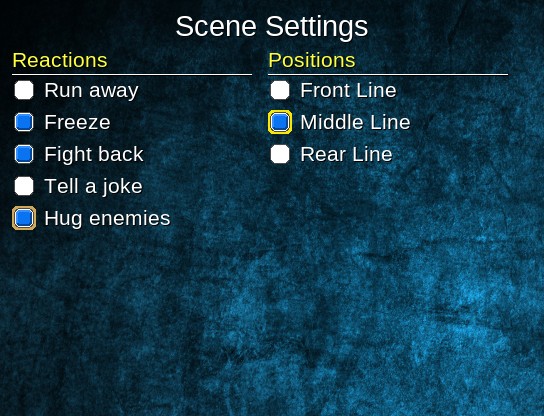
KToggleButtons VX by Kyonides Arkanthes Introduction Are you bored of using the same old text buttons?
Archived First Post
KToggleButtons VX
by Kyonides Arkanthes
by Kyonides Arkanthes
Introduction
Are you bored of using the same old text buttons?
Now you can replace them with some good looking Toggle Buttons!
Version 1.1.1
It's also available for XP & VX ACE!
It's also available for XP & VX ACE!
Instructions
Define a New Style
Ruby:
STYLES[:basic] = { :name => "Basica", :cursor => "cursor1", :cursor_off => ""cursor2,
    :on => "toggle1", :off => "toggle2", :button => "toggle3" }
Change Current Toggle Button Style - Use any of the keys you enter in the STYLES Hash.
Ruby:
$game_system.toggle_button_style = :basicHow to Define a Toggle Button Manager
Ruby:
@manager = KToggle::Manager.new(FontSize, LineHeight, "Name", LabelsArray)
@manager.setup_buttons(X, Y, LabelWidth, LabelHeight)
@manager.setup_cursor(true) # Create an Active Cursor
How to Set a State - Repeat as many times as deemed necessary!
Ruby:
@manager.set_state(index, some_variable)How to Get a State - Here 1 stands for the first position in the Array.
Ruby:
@manager.state?(1)Since the demos include a TestScene script, you can take a :detective: look at it to learn a bit more on how to create your custom scene script.
Terms & Conditions
Free for non commercial games.
Contact me if you needed for commercial games.
Mention me in your game credits.
Downloads / Referenced Files
RPG Maker Web attachments are mirrored locally when available. Other external links remain hosted by their original creator or third-party service.
- Download: The Demos
License / Terms Note
Free for non commercial games. Contact me if you needed for commercial games. Mention me in your game credits.
Referenced Images / Attachments
Creator Claims / Removal
If you are the original creator and want this listing reassigned, edited, or removed, join BMMPlay and contact the moderators with proof that matches the original RPG Maker Web profile, linked GitHub, itch.io page, or another public creator identity.
Replies (0)
No replies yet.
0
replies
29
views
Topic Summary
Loading summary...