

VXVenima's Little Shop Mod
BMM_Archive · July 16, 2026

BMM_Archive
Preserved forum archive. This topic stores the original first post and locally mirrored RPG Maker Web attachments when available. It is posted by the BMMPlay archive account, not by the original creator.
Original Source
- Original title: Venima's Little Shop Mod
- Original author: Venima
- Original date: April 26, 2015
- Source thread: https://forums.rpgmakerweb.com/threads/venimas-little-shop-mod.39291/
- Source forum path: Game Development Engines > Ruby Game System (RGSS) Scripts > RGSS2 Scripts (RMVX)
Summary
Venima's Shop Mod 1.0 Introduction This little mod enables a bit more control over the Shop Processing event, by allowing shop categorisation and multipliers for shop prices...
Archived First Post
Venima's Shop Mod 1.0
Introduction
This little mod enables a bit more control over the Shop Processing event, by allowing shop categorisation and multipliers for shop prices...
Features
- Allows you to specify a multiplier for a shop's buying price and selling price (specified by controlling a variable before processing begins), so that you can have cheaper or more expensive shops in different locations, or vary the prices in the same shop.
- Allows you to restrict which items can be sold at a particular shop, defined by the comment tags of the items you wish to sell, and specified by setting variables that denote the item types prior to the shop processing event.
Usage Screenshots
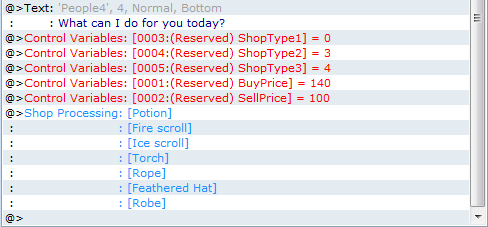
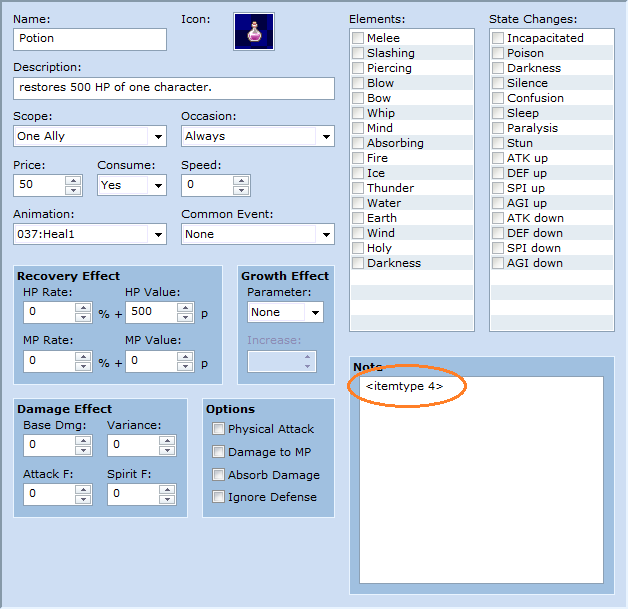
How to Use
Place above main (under Materials). See the top of the script for further instructions. There're screenshots and a demo for you to check out too!
Demo
View attachment Venima Shop Mod Demo.zip
Script
FAQ
See the script notes at the top of the script for the technical FAQ.
Q: Can I have items that can't be sold?
A: Yes, the demo has a few examples of some.
Q: Does this include weapons and armor?
A: Yes, they use the same tags.
Q: Can I alter the price of specific items based on the shop?
A: Not with this mod, but there's nothing stopping you from altering a specific item's price by using the script event: $data_items[item_index].price = 50, for example.
Q: How many categories can I have?
A: As many as you like, however, keep in mind you can only have 4 categories sell-able at a time (alternative: you can have all categories sell-able except up to 3). There's no real reason for this limit except that I had to stop somewhere, feel free to add more yourself, I'm sure you can figure out how by studying the 'include?(item)' function!
Credit
- Venima
Edit: Updated links and script as of 22/11/16 (they should no longer be broken).
Introduction
This little mod enables a bit more control over the Shop Processing event, by allowing shop categorisation and multipliers for shop prices...
Features
- Allows you to specify a multiplier for a shop's buying price and selling price (specified by controlling a variable before processing begins), so that you can have cheaper or more expensive shops in different locations, or vary the prices in the same shop.
- Allows you to restrict which items can be sold at a particular shop, defined by the comment tags of the items you wish to sell, and specified by setting variables that denote the item types prior to the shop processing event.
Usage Screenshots
How to Use
Place above main (under Materials). See the top of the script for further instructions. There're screenshots and a demo for you to check out too!
Demo
View attachment Venima Shop Mod Demo.zip
Script
Code:
#==============================================================================
# ~~~ VENIMA'S SHOP MOD ~~~ Version 1.0
#==============================================================================
#  --Effects of this script:
#
#  Gives more flexibility for shops using the default Shop Processor
#   command, essentially:
#
#  Item prices become dependant on the shop (multiplied by two separate
#   variables, one for bought, one for sold).
#  Items available to sell become dependant on the shop type (shops have
#   up to 4 types, or 3 non-types).
#------------------------------------------------------------------------------
#  --How to:
#
#  ---Initial Preparation:
#  Step 1: Decide upon the variable ids in the module section below (line 63).
#    If you have never done this before, please seek my shop mod tutorial in
#    the associated RPG VX forum topic.
#  Step 2: For each item/weapon/armor, enter <itemtype x> in the small
#    box labelled "Note", and replace the x with a number representing
#    its type (please look below to see an example list of types, line 96).
#    Note: items default to type -1, which is reserved for unsellable items.
#
#  ---Setting up a Shop:
#  Step 1: Create a shop process as usual with the eventing window. If you
#    have not used the shop process command before, please seek my shop mod
#    tutorial in the associated RPG VX forum topic.
#  Step 2: Before the shop process is called, set the shop type
#    variables with the associated ids (ids are below, line 89).
#  Step 3: Before the shop process is called, set the buy and sell
#    price multiplers (100 is standard price).
#------------------------------------------------------------------------------
#  --Bugs FAQ
#
#  Q: All the bought/sold items in the shop are worth 0 gold! What's going on?
#  A: Your buy/sell price multipler has not been set correctly (still on 0),
#      please refer to "Setting up a shop" Step 3.
#
#  Q: Some/all items aren't being shown in the sell section of the shop!
#  A: You may have forgotten to add the itemtype to that item, please refer
#      to "Initial Preparation" Step 2.
#  A: You may have forgotten to set which types the shop accepts, please
#      refer to "Setting up a Shop" Step 2.
#  A: SHOP_TYPE_VAR1 may be -1, if this the case, the other shop types will
#      be excluded rather than included. Please refrain from using -1 as a
#      type for items unless they're absolutely unsellable.
#  A: The ITEMTYPE regular expression may be faulty, try replacing line 50
#      with: ITEMTYPE = /<(?:itemtype|type)[\s_]?(\d+)>/i
#------------------------------------------------------------------------------
#  --Tips
#
#  Tip: Set the buy/sell price multiplier to 100 when the game begins by
#        placing an event on the same map as the player's starting position
#        that autoruns. Don't forget to erase the event at the end of its
#        processing.
#  Tip: Decide upon all the item types early on and note them down below for
#        referring to later.

#==============================================================================
#  You may modify the values in the below module:
#==============================================================================

module VENIMA_SHOP_MOD

      # The line below is the "Regular Expression" used to determine
      # the tag found in the item/weapon/armor Note box of the database
      # window.
      # It currently searches for: <itemtype x> or <type x> where x is
      # a NUMBER of your choice. You may need to modify this line if
      # it conflicts with the expression of another mod. If you somehow
      # break it, check the Bugs FAQ for a duplicate of the original.
      ITEMTYPE = /<(?:itemtype|type)[\s_]?(\d+)>/i

      # Determines the variable id to use to multiply bought item prices.
      # A value of 100 means 100% of the default price. So if an item has
      # a value of 10, and this variable is set to 150, the price in the
      # shop becomes 15.
      BUY_PRICE_MULTIPLIER_VAR = 1
      # Determines the variable id to use to multiply sold item prices.
      # A value of 100 means 100% of the default sell price. So if an item
      # you own has a buy value of 8, and this variable is set to 150, the
      # price in the shop becomes 6 (4 x 1.5, since sell price is 50%).
      SELL_PRICE_MULTIPLIER_VAR = 2

      # Determines the variable ids for deciding the shop types
      # If SHOP_TYPE_VAR1's variable value is -1, all items may be sold in
      # this shop except for those whose types are VAR2, VAR3, or VAR4.
      SHOP_TYPE_VAR1 = 3
      SHOP_TYPE_VAR2 = 4
      SHOP_TYPE_VAR3 = 5
      SHOP_TYPE_VAR4 = 6

end # VENIMA_SHOP_MOD

#==============================================================================
#  Here's the list of item types I made for reference in my game,
#    please feel free to modify this list (note this will not make a
#    difference in the game, it's just here to help you be organised!)
#
#  0 = general
#  1 = weapon
#  2 = armor
#  3 = tools
#  4 = potions
#  5 = magic items
#  6 = artefacts
#
#  Example: A gold nugget item would have "<itemtype 0>" in its note box.
#==============================================================================


#==============================================================================
#
#---------------------- DO NOT EDIT BEYOND THIS POINT! ------------------------
#
#==============================================================================

class RPG::BaseItem

  #--------------------------------------------------------------------------
  # common cache: load_notetags_itemtype
  #--------------------------------------------------------------------------
  def load_notetags_itemtype
    @itemtype = -1
    #---
    self.note.split(/[\r\n]+/).each { |line|
    case line
    #---
    when VENIMA_SHOP_MOD::ITEMTYPE
      @itemtype = $1.to_i
    #---
    end
    } # self.note.split
    #---
  end

  def itemtype
    load_notetags_itemtype if @itemtype.nil?
    return @itemtype
  end

  def buyprice
    return (@price * $game_variables[VENIMA_SHOP_MOD::BUY_PRICE_MULTIPLIER_VAR] / 100)
  end

  def sellprice
    return (@price * $game_variables[VENIMA_SHOP_MOD::SELL_PRICE_MULTIPLIER_VAR] / 100)
  end

end # RPG::BaseItem

#==============================================================================
# ** Window_ShopSell
#------------------------------------------------------------------------------
#  This window displays items in possession for selling on the shop screen.
#==============================================================================

class Window_ShopSell < Window_Item

  #--------------------------------------------------------------------------
  # * Whether or not to include in item list
  #     item : item
  #--------------------------------------------------------------------------
  def include?(item)
    return false if item == nil
    return false if item.itemtype == -1

    var1 = $game_variables[VENIMA_SHOP_MOD::SHOP_TYPE_VAR1]
    var2 = $game_variables[VENIMA_SHOP_MOD::SHOP_TYPE_VAR2]
    var3 = $game_variables[VENIMA_SHOP_MOD::SHOP_TYPE_VAR3]
    var4 = $game_variables[VENIMA_SHOP_MOD::SHOP_TYPE_VAR4]

    if var1 == -1
      return false if var2 == item.itemtype
      return false if var3 == item.itemtype
      return false if var4 == item.itemtype
      return true
    else
      return true if var1 == item.itemtype
      return true if var2 == item.itemtype
      return true if var3 == item.itemtype
      return true if var4 == item.itemtype
      return false
    end
  end
  #--------------------------------------------------------------------------
  # * Whether or not to display in enabled state
  #     item : item
  #--------------------------------------------------------------------------
  def enable?(item)
    return (item.sellprice > 0)
  end
end


#==============================================================================
# ** Window_ShopBuy
#------------------------------------------------------------------------------
#  This window displays buyable goods on the shop screen.
#==============================================================================

class Window_ShopBuy < Window_Selectable
  #--------------------------------------------------------------------------
  # * Draw Item
  #     index : item number
  #--------------------------------------------------------------------------
  def draw_item(index)
    item = @data[index]
    number = $game_party.item_number(item)
    #modified item.price to item.buyprice
    enabled = (item.buyprice <= $game_party.gold and number < 99)
    rect = item_rect(index)
    self.contents.clear_rect(rect)
    draw_item_name(item, rect.x, rect.y, enabled)
    rect.width -= 4
    self.contents.draw_text(rect, item.buyprice, 2)
  end
end


#==============================================================================
# ** Scene_Shop
#------------------------------------------------------------------------------
#  This class performs shop screen processing.
#==============================================================================

class Scene_Shop < Scene_Base
  #--------------------------------------------------------------------------
  # * Update Buy Item Selection
  #--------------------------------------------------------------------------
  def update_buy_selection
    @status_window.item = @buy_window.item
    if Input.trigger?(Input::B)
      Sound.play_cancel
      @command_window.active = true
      @dummy_window.visible = true
      @buy_window.active = false
      @buy_window.visible = false
      @status_window.visible = false
      @status_window.item = nil
      @help_window.set_text("")
      return
    end
    if Input.trigger?(Input::C)
      @item = @buy_window.item
      number = $game_party.item_number(@item)
      if @item == nil or @item.buyprice > $game_party.gold or number == 99
        Sound.play_buzzer
      else
        Sound.play_decision
        max = @item.buyprice == 0 ? 99 : $game_party.gold / @item.buyprice
        max = [max, 99 - number].min
        @buy_window.active = false
        @buy_window.visible = false
        @number_window.set(@item, max, @item.buyprice)
        @number_window.active = true
        @number_window.visible = true
      end
    end
  end
  #--------------------------------------------------------------------------
  # * Update Sell Item Selection
  #--------------------------------------------------------------------------
  def update_sell_selection
    if Input.trigger?(Input::B)
      Sound.play_cancel
      @command_window.active = true
      @dummy_window.visible = true
      @sell_window.active = false
      @sell_window.visible = false
      @status_window.item = nil
      @help_window.set_text("")
    elsif Input.trigger?(Input::C)
      @item = @sell_window.item
      @status_window.item = @item
      if @item == nil or @item.sellprice == 0
        Sound.play_buzzer
      else
        Sound.play_decision
        max = $game_party.item_number(@item)
        @sell_window.active = false
        @sell_window.visible = false
        @number_window.set(@item, max, @item.sellprice / 2)
        @number_window.active = true
        @number_window.visible = true
        @status_window.visible = true
      end
    end
  end
  #--------------------------------------------------------------------------
  # * Confirm Number Input
  #--------------------------------------------------------------------------
  def decide_number_input
    Sound.play_shop
    @number_window.active = false
    @number_window.visible = false
    case @command_window.index
    when 0  # Buy
      $game_party.lose_gold(@number_window.number * @item.buyprice)
      $game_party.gain_item(@item, @number_window.number)
      @gold_window.refresh
      @buy_window.refresh
      @status_window.refresh
      @buy_window.active = true
      @buy_window.visible = true
    when 1  # sell
      $game_party.gain_gold(@number_window.number * (@item.sellprice / 2))
      $game_party.lose_item(@item, @number_window.number)
      @gold_window.refresh
      @sell_window.refresh
      @status_window.refresh
      @sell_window.active = true
      @sell_window.visible = true
      @status_window.visible = false
    end
  end
end
FAQ
See the script notes at the top of the script for the technical FAQ.
Q: Can I have items that can't be sold?
A: Yes, the demo has a few examples of some.
Q: Does this include weapons and armor?
A: Yes, they use the same tags.
Q: Can I alter the price of specific items based on the shop?
A: Not with this mod, but there's nothing stopping you from altering a specific item's price by using the script event: $data_items[item_index].price = 50, for example.
Q: How many categories can I have?
A: As many as you like, however, keep in mind you can only have 4 categories sell-able at a time (alternative: you can have all categories sell-able except up to 3). There's no real reason for this limit except that I had to stop somewhere, feel free to add more yourself, I'm sure you can figure out how by studying the 'include?(item)' function!
Credit
- Venima
Edit: Updated links and script as of 22/11/16 (they should no longer be broken).
Features Mentioned
- Allows you to specify a multiplier for a shop's buying price and selling price (specified by controlling a variable before processing begins), so that you can have cheaper or more expensive shops in different locations, or vary the prices in the same shop.
- Allows you to restrict which items can be sold at a particular shop, defined by the comment tags of the items you wish to sell, and specified by setting variables that denote the item types prior to the shop processing event.
- Usage Screenshots
- "lightbox_close": "Close",
- "lightbox_next": "Next",
- "lightbox_previous": "Previous",
- "lightbox_error": "The requested content cannot be loaded. Please try again later.",
- "lightbox_start_slideshow": "Start slideshow",
- "lightbox_stop_slideshow": "Stop slideshow",
- "lightbox_full_screen": "Full screen",
- "lightbox_thumbnails": "Thumbnails",
- "lightbox_download": "Download",
- "lightbox_share": "Share",
- "lightbox_zoom": "Zoom",
- "lightbox_new_window": "New window",
- "lightbox_toggle_sidebar": "Toggle sidebar"
Downloads / Referenced Files
RPG Maker Web attachments are mirrored locally when available. Other external links remain hosted by their original creator or third-party service.
- Local mirror: 10617-058b899678249b974afbba419e6b7a3f.png
SHA-256:ebbaa74a5448750d4203d3c620eaae5b5d78280931dc59d2c1d0470f3727b2cd
Original attachment URL: https://forums.rpgmakerweb.com/attachments/shopmod-png.20464/ - Local mirror: 10624-a43a0324d692a1e3e25f54d680b982fe.png
SHA-256:06146ded13e8ff3d7c6826f217aa570fb5e221725de10fd0d1fd2f8f20df59a5
Original attachment URL: https://forums.rpgmakerweb.com/attachments/shopmod2-png.20472/ - Local mirror: Venima-Shop-Mod-Demo.zip
SHA-256:8cb964deda09f91810dd27d5eb05180530e9ff44e2f58faed71371428789e875
Original attachment URL: https://forums.rpgmakerweb.com/attachments/venima-shop-mod-demo-zip.52664/
License / Terms Note
Credit - Venima Edit: Updated links and script as of 22/11/16 (they should no longer be broken).
Referenced Images / Attachments
Creator Claims / Removal
If you are the original creator and want this listing reassigned, edited, or removed, join BMMPlay and contact the moderators with proof that matches the original RPG Maker Web profile, linked GitHub, itch.io page, or another public creator identity.
Replies (0)
No replies yet.
0
replies
18
views
Topic Summary
Loading summary...