

RPGMaker for Dummies, Part 2 - Dialog
BMM_Archive · July 16, 2026

Original Source
- Original title: RPGMaker for Dummies, Part 2 - Dialog
- Original author: HawkZombie
- Original date: September 21, 2017
- Source thread: https://forums.rpgmakerweb.com/threads/rpgmaker-for-dummies-part-2-dialog.84214/
- Source forum path: Game Development Engines > RPG Maker Tutorials > Non-Maker Specific Tutorials
Summary
Hey guys, I'm back at it again! If you'd like to start from the previous Lesson, head on over to see some tips and tricks for dealing with Typos. Today we are going to tackle something a bit more advanced, but one that I feel can help make projects, even those with flat or lackluster characters (it happens!) pop. Dialog! Below I will offer tips and tricks for not only writing, but formatting so it looks good as well. Requirements: Aside from the RPGMaker program of your choice (I will...
Archived First Post
Requirements: Aside from the RPGMaker program of your choice (I will be using RMMV for my examples) you will need access to a word processor. Google Docs has an excellent free one, and I personally love using Apache OpenOffice for writing offline (and it was wonderful to format my books). For further examples I will be using OpenOffice. I will also be assuming you have some basic grasp of how the RPGMaker works to create events, etc.
Dialog with so much body, Maybe it's Maybelline™
Ok, so you've just gotten to a critical junction in your game, a fight between two characters. Harold is arguing with Marsha while they are in the depths of an icky dungeons. This is the interaction you wish to have happen:
Harold: You need to stop whining, it is dumb. You sound like a baby. Seriously.
Marsha: We have been here for hours. Do you even know where we are? When does this end?
Harold: Trust me, it's almost over.
Marsha: Alright...since it is you, I trust you.
For the most part...this gets the job done.
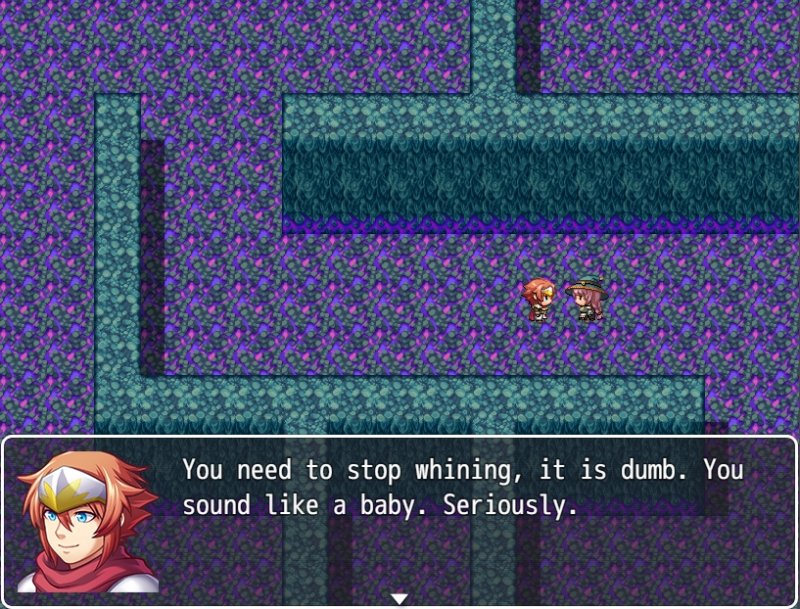
But, it looks a bit flat for an argument. It also doesn't flow like natural dialog would. It feels clunky and a bit robotic; like they are just speech boxes delivering words.
So how do we spruce this up and make it not only interesting, but relevant?
First of all, ask yourself. Why are they fighting? Is it in their character to fight? Are they best friends? Lovers? Is being in the dungeon for so long testing their bond?
Let's say you decided early on that Harold and Marsha have an unspoken attraction for one another, but this dungeon, and Harold's leadership, is really putting it to the test for Marsha.
Next, ask yourself is this fight necessary to the story? Does it give insight into the characters and their plight? Does some kernel of truth drop that is a big reveal for the plot?
This fight comes at a half-way point in the dungeon, and is being used to break the monotony of constant treasure hunting and enemy grinding. To make it more relevant, you want to include a big reveal from Marsha to Harold, the admission of her attraction to him.
Finally, ask yourself is this something a real person would say? Is it something the character would say? Read it out loud, acting out each person's part. Does it feel or flow naturally? Or is it just words words words WORDS WITH VOLUME words?
The interaction between them feels flat and lifeless, so it needs to be spruced up and made more dynamic.
So, after deciding these things as we have above, we now want to work on making the dialog more dynamic. The normal means of making writing more dynamic are adjectives and adverbs. However, since this is purely dialog, they don't work as well in this situation to spruce things up. So, we'll not only elaborate the scene, but use RPGMaker's text tools to help make things look better.
I will be assuming you know the text tags for RMMV for the following parts. However, if not, simply let your mouse hover over the text entry screen and a popup window will show up giving you all the base options. I will only list them if people would like me too; there are more than a few.
Anyway, this is the new dialog I came up with since we better honed the scene and our intent.
Marsha: Ok. <span style="color: #ff0000">ENOUGH. Harold, can we stop and talk?
Harold: Um, ok? I guess we can take a rest here for a moment. What's up?
Marsha: We've been here for hours, and we still haven't found the <span style="color: #4da6ff">orb.
Harold: We will. We <span style="color: #ff8000">have to.
Marsha: Is that <span style="color: #ff8000">all you want?
Harold: It doesn't matter what I want.
Marsha: Then what about what I want?! I...forget it. You won't care.
Harold: Care about what? How much you hate dungeons?
Marsha: You're impossible! Harold...I want YOU!!
Harold: You...I...look, after this is over, we'll talk. I promise.
Marsha: ...alright. Let's finish this.
The dialog flows more naturally, and it also gives us a bit more insight into each character's motivation. There are no hard and fast rules or guidelines to writing believable dialog; it is really up to you, the writer, to come up with what you believe to be a good scene. Practice in this case really does make perfect. Writer and rewrite until it sounds good to you, and to others you share it with.
Now, while what I've written above is good, don't forget to use RPGMaker's tools to really spruce things up. You can change the color of words for emphasis (ignore my color choices lol) and also increase/decrease the font size as well. Another neat trick (can't really show it in images) is to add pauses in between words (and characters), or cause an entire line to appear at once, as if it were blurted out.
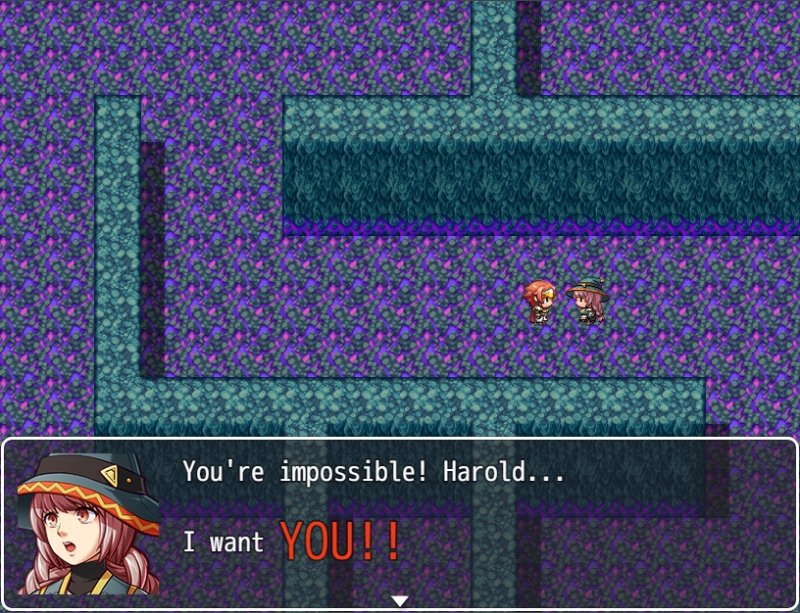
The key things to take away from this lesson are try your best to not only make it flow naturally, and to use it at the proper moments, but to utilize the engine's different tags to make it more of a dynamic read, and one that isn't so flat. It's almost impossible to tell tone and intent from text alone ;P
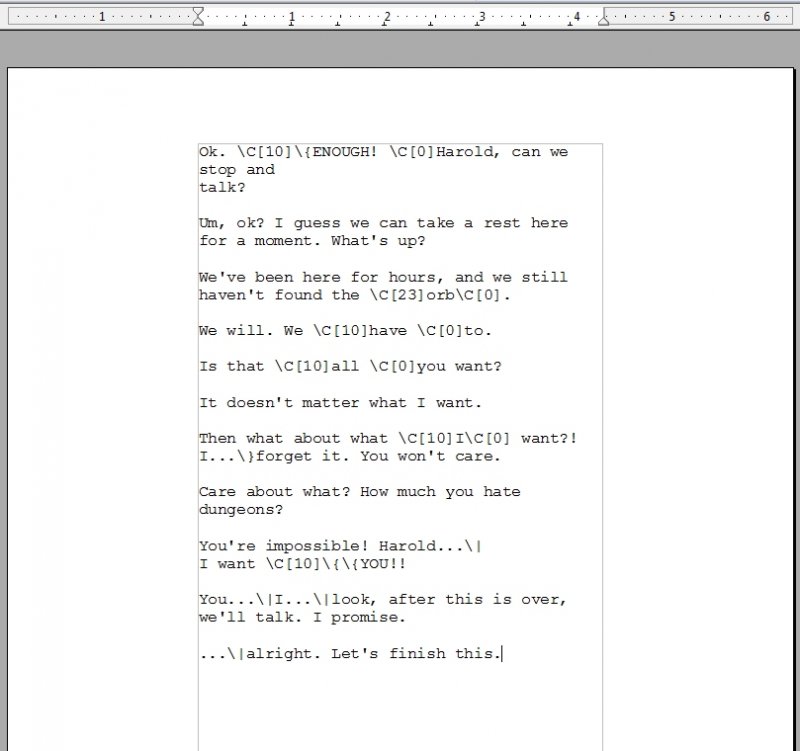
If you're using Open Office (or even Google Docs) open a new file. Change the font to Courier New. Keep in mind that each text entry box, for the default, is approximately 42 characters if using a face set, and 55 characters wide if not. If you're using a wider window than default, you'll have to play around a bit to hit your special number.
Anyway, since we want 42 characters, divide this number by 10 to get 4.2...this is the inches wide we want our document, and we now need to adjust our margins to reach it. 8.5 (standard document size) minus 4.2 = 4.3"...divide by two, and we get our new left and right margin amounts of 2.15"...but I still had to play around a little in OpenOffice and set my margins to 2" each to hit 42 characters wide.
Next, write out your dialog first, then hit enter at the end of each line. Why? This ensures that when you put in your special formats, the end result will look exactly how you want it on each line.
Another day, another lesson! I hope you enjoyed this one, and be sure to leave any comments or questions below.
Downloads / Referenced Files
RPG Maker Web attachments are mirrored locally when available. Other external links remain hosted by their original creator or third-party service.
- Local mirror: 50869-b2c9fccef0698d0f551048a2ca9bdbe6.jpg
SHA-256:e6dc5b642d8e4a43ab9b1af1b18108efc1ec4fe51a31539d92dda19130032c79
Original attachment URL: https://forums.rpgmakerweb.com/attachments/image1-jpg.72371/ - Local mirror: 50870-fb885a857ebd6b1fc4c881b05ab99c98.jpg
SHA-256:8ebe0c73579bedb04cfd60692ecd372c4c97442444e74ae50e1c0633f18e8067
Original attachment URL: https://forums.rpgmakerweb.com/attachments/image2-jpg.72372/ - Local mirror: 50871-b2d76cad75a5f83211480ece8fb4429b.jpg
SHA-256:29038c6c838cff93e5f87d70c2bc427a2bdfdf299e5e07ea5745b513993357a0
Original attachment URL: https://forums.rpgmakerweb.com/attachments/image3-jpg.72373/
Referenced Images / Attachments
Creator Claims / Removal
If you are the original creator and want this listing reassigned, edited, or removed, join BMMPlay and contact the moderators with proof that matches the original RPG Maker Web profile, linked GitHub, itch.io page, or another public creator identity.
Replies (0)
No replies yet.
Topic Summary
Loading summary...