

Adding visual cues to your events
BMM_Archive · July 16, 2026

Original Source
- Original title: Adding visual cues to your events
- Original author: IsFutureBright
- Original date: March 22, 2016
- Source thread: https://forums.rpgmakerweb.com/threads/adding-visual-cues-to-your-events.59113/
- Source forum path: Game Development Engines > RPG Maker Tutorials > Non-Maker Specific Tutorials
Summary
Hey guys, how is it going? I've written a short article on how to add visual cues to your events in order to make it easier for you when you go back to your maps to fix or add something. Pasting from my original blog post: I’ve been meaning write some tips about RPG Maker for a while but never seemed to find the time. With things quieter with Ladra, I’ve decided to stop being lazy about this and just make it happen. This time around I’ll be talking about adding...
Archived First Post
I’ve been meaning write some tips about RPG Maker for a while but never seemed to find the time. With things quieter with Ladra, I’ve decided to stop being lazy about this and just make it happen.
This time around I’ll be talking about adding visual cues to your events.
It’s usually pretty helpful to be able to quickly identify your events without having to open them up. In case of events that work as a controller, like with the flow of a cutscene for example, it’s nice to have a visual reminder about it.
So the first thing that I do is I create a character named Director (or any you like, really) and use him as a global variable. In Ladra’s case this worked really well since I only had one character at all times, but even if your games has a big party I’m pretty sure you can tailor the idea to your needs.
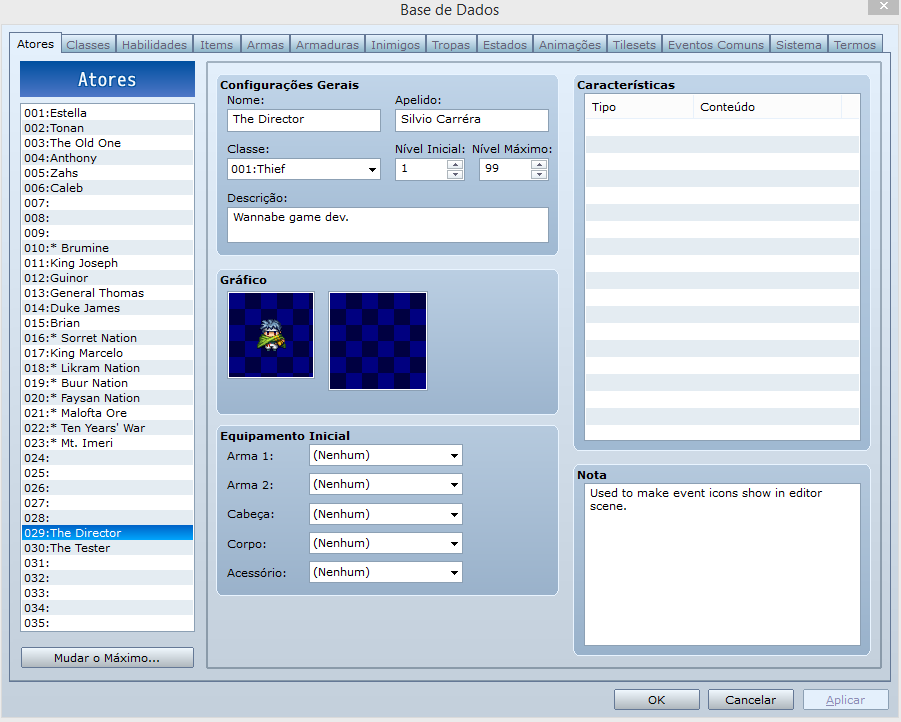
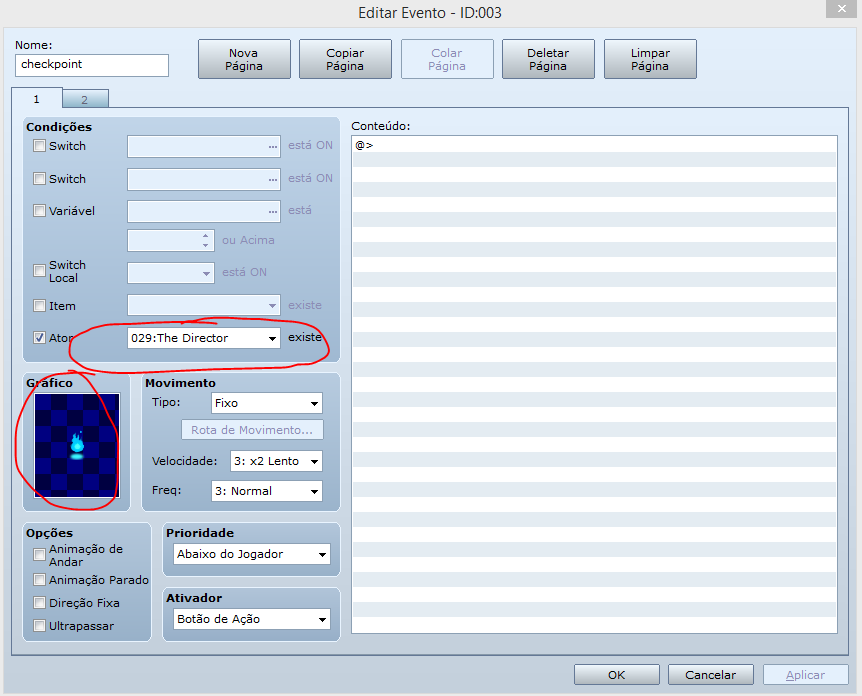
With this set up, you can configure your events so the first page always checks to see if this character is in the party. Since he’ll never be, the first page will just be ignored, but since the first one is used by RPG Maker you’ll be able to see it clearly on the map you’re editing.
The final result will be something as seen below. In it I have two event on the left corner where the first one is my cue for checkpoints while the second is used to start the music. On the bookshelf you can also see another cue which is for the book collectible present throughout the game.
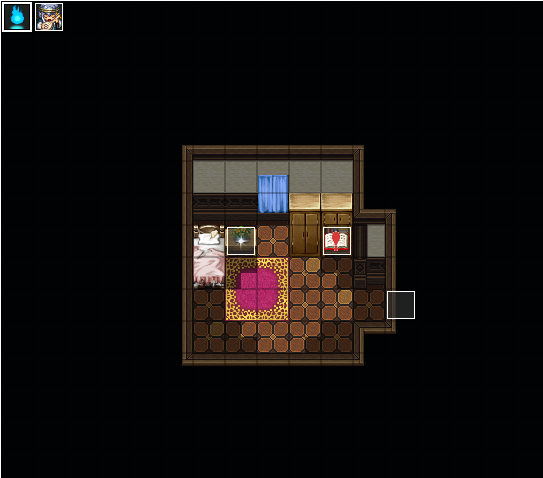
This makes it a hundred times easier for me when I’m going back through the maps to rework or patch something up.
Well, that’s it for now. I hope you guys enjoyed it and can make good use of it in your projects. Cheers o/
--
If you guys liked it please comment below and check out the blog here and if you wanna try Ladra out, feel free as well.
Downloads / Referenced Files
RPG Maker Web attachments are mirrored locally when available. Other external links remain hosted by their original creator or third-party service.
- Local mirror: 19960-8952055ee7e8c634053089b9755b2eac.png
SHA-256:fbb8d8d09e9e56d688f2950725101d5e5693d62c09ffa2f9f7ce93484c97476e
Original attachment URL: https://forums.rpgmakerweb.com/attachments/rpgmakertip1_a-png.34032/ - Local mirror: 19962-4b2385dec88c7eeaaf17d42d6c144e7e.png
SHA-256:4d3e44eb4dfb75e4d4737151c6905b4488f9bcd1fbdc62322117f46ddeb3c079
Original attachment URL: https://forums.rpgmakerweb.com/attachments/rpgmakertip1_c-png.34034/ - Local mirror: 19961-46668587d44ebae16b64ff9be12f3bc9.png
SHA-256:724bfdfe34cecbb8a630bc87f7b63f1891b0fd69e714e9e120f27866bdf0e318
Original attachment URL: https://forums.rpgmakerweb.com/attachments/rpgmakertip1_b-png.34033/
Referenced Images / Attachments
Creator Claims / Removal
If you are the original creator and want this listing reassigned, edited, or removed, join BMMPlay and contact the moderators with proof that matches the original RPG Maker Web profile, linked GitHub, itch.io page, or another public creator identity.
Replies (0)
No replies yet.
Topic Summary
Loading summary...